


Rizzler AI: Texting Wingman
4.9123.00 Reviews
App Specs
- Version
- 4.4.2
- Updated On
- License
- Free
- Downloads
- 100,000+
- Developer
- Cognix Dev.
- Categories
- Lifestyle
- Platform
- Android
Screenshots
 Analysis by AppCompare
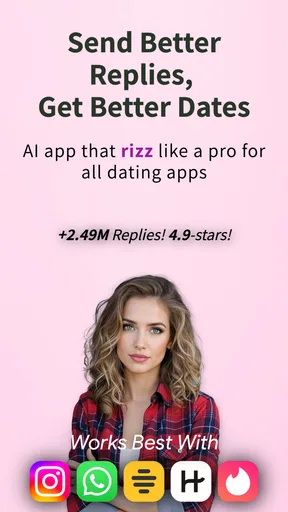
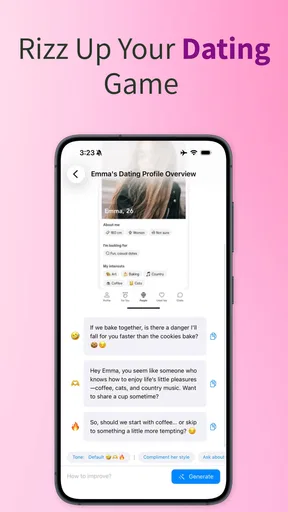
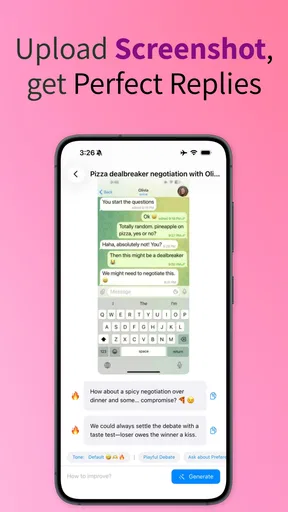
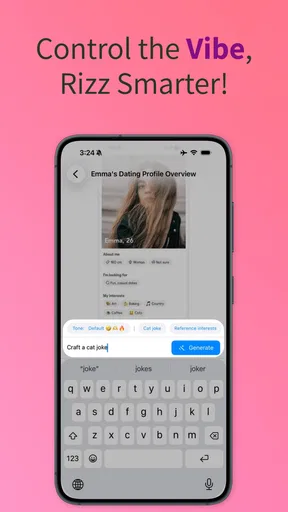
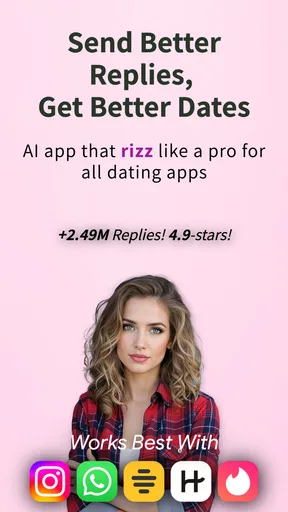
I tried Rizzler AI: Texting Wingman as a lifestyle app for the awkward moments when I knew what I wanted to say but could not find a natural way to say it. Its focus is simple: help shape messages, suggest playful lines, and give a little confidence during texting or dating conversations. That makes it more useful as a quick writing companion than as a complete dating service.
The appeal is easy to understand. A blank message field can make a normal conversation feel like a high-pressure test, especially when you are replying to someone you like. Instead of searching through random pickup-line pages or asking a friend to rewrite every message, I could use the app as a fast brainstorming step. The best results came when I treated its suggestions as starting points rather than messages to copy without thinking.
It is a free app in the lifestyle category, developed by Cognix Dev., with optional purchases ranging from $2.49 to $34.99 per item. The age guidance is Everyone 10+, which fits a tool centered on social conversation, although younger users should still remember that advice from an automated writing tool is not a substitute for good judgment online.
How the texting wingman feels in everyday use
The most practical way to use this app is before sending a message that matters. I might receive a short reply, a teasing comment, or an opening that deserves more than “haha,” then use the app to explore a few possible directions. That small pause is valuable because it moves me away from panic-writing and toward choosing a tone deliberately.
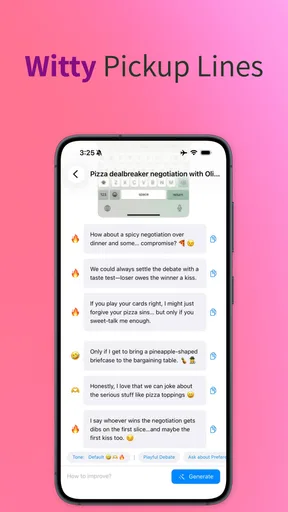
I found three useful modes of thinking while using it. First, there is the direct reply: something that keeps the conversation moving. Second, there is the playful response: a little more confident without becoming too intense. Third, there is the recovery message for a conversation that has gone quiet or awkward. Those situations need different levels of energy, and blindly using the same style for all of them is one of the fastest ways to sound artificial.
A realistic example would be a weekday evening when I am chatting with someone after work. They mention that they are tired but still want to talk. A dramatic pickup line would feel wrong, while a dry “get some rest” could end the exchange. I would use the app to generate a warmer option, then edit it so it reflects the actual conversation. The useful part is not the clever wording alone; it is the reminder to match the other person’s mood.
That editing step matters more here than it might seem. AI-generated flirting can easily become too polished, too confident, or oddly specific. A line that looks impressive on screen may sound unlike me when sent. I recommend removing exaggerated compliments, replacing unfamiliar slang, and keeping one concrete detail from the real conversation. That turns a generic suggestion into something that feels connected to the person receiving it.
Worth Reading Before You Choose

Flipboard Shows What News Apps Must Do Beyond the Feed

Switching to Android Auto Means Rethinking Your Driving Routine

Google Calendar Makes a Crowded Week Easier to Manage

Ludo King Makes the Most of the Minutes Between Plans

Baby Panda World Brings Quick Play to Modern Phones, but Its Game Library Feels Busy

ESPN’s Live Game View Makes Following Close Games Easier
The app is also handy for people who overthink tone. Text removes facial expressions and voice, so a sentence intended as playful can appear rude, while a sincere compliment can feel overly serious. I used the suggestions as a way to compare tones before deciding. If two versions communicate the same idea, I usually choose the shorter one because it leaves room for the other person to respond.
Where it is stronger than ordinary alternatives
The usual alternatives are search engines, collections of pickup lines, social media advice, or a friend who knows your personality. Each has a weakness. Search results often give broad lists without the context of your conversation. Pickup-line collections can be entertaining but repetitive. Friends understand your intentions, yet they are not always available when you need a quick reply.
This app sits between those options. It is faster than explaining an entire conversation to a friend and more adaptable than copying a fixed list. Its value is highest when I already know the basic message I want to send but need help with wording. It is less valuable when I need serious relationship advice, help interpreting a troubling interaction, or a thoughtful conversation about boundaries.
That distinction is important because “rizz” advice can encourage performance over honesty. The strongest use of the app is not trying to appear like a different person. It is finding a clearer, lighter, or more confident way to express something I genuinely mean. If the suggested line depends on pretending to have a personality I do not have, I skip it.
Trust begins with what I choose to share
Because this is an AI texting tool, the most sensitive moment is not choosing a funny line; it is deciding what conversation context to enter. I would avoid pasting full message histories, names, phone numbers, addresses, workplace details, private photographs, or anything that could identify another person. Usually, the app needs only the minimum context required to understand the tone.
For example, instead of pasting a complete conversation, I could write that the other person made a light joke about cooking and that I want a playful reply. That gives the tool a direction without exposing the entire exchange. This is a much better habit than treating an AI assistant like a private diary.
I also recommend removing details that are emotionally sensitive. If the conversation involves an argument, a breakup, health information, or someone else’s personal situation, I would first rewrite the situation in general terms. The less identifiable material I submit, the more control I retain over the interaction. This is not about assuming anything about the developer’s practices; it is simply a sensible way to use any online writing service.
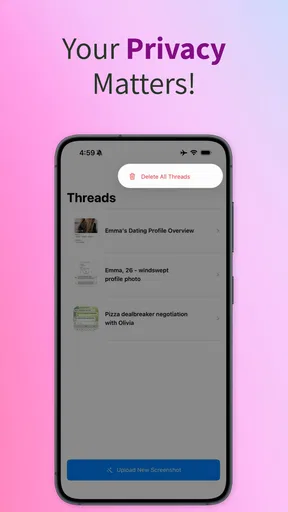
Before relying on the app regularly, I would read the privacy information and check the permissions and account choices shown on the device or in the app. Those screens are where I want to understand what access is requested, whether an account is needed, and what controls are available for submitted content. I would not grant access that is unrelated to generating text, and I would review those choices again after a major update.
The current release is version 4.4.2, and the app requires Android 7.0 or later. That makes it accessible on many older Android devices, but compatibility alone should not decide whether I trust it with personal conversations. A supported device tells me the app can run; it does not replace checking visible privacy settings or deciding what information is appropriate to share.
Keeping control over the final message
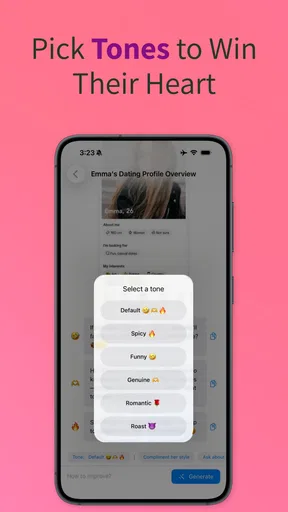
The app works best when I remain the editor. I would ask for a tone, inspect the result, and then rewrite it in my own voice. That workflow gives me three useful checks: does the message sound like me, does it respond to what the other person actually said, and does it leave the other person comfortable replying? If any answer is no, the generated line is not ready.
A small but effective technique is to request several levels of intensity mentally, even if I only use one result: relaxed, playful, and direct. The relaxed version is usually safest for a new conversation. The playful version can work when teasing is already mutual. The direct version should be reserved for situations where interest is clear and the message will not create uncomfortable pressure.
I would also avoid sending multiple generated options in a row. That can make a conversation feel like a performance or reveal that the messages are not spontaneous. One suggestion, edited carefully, is more convincing than a stream of increasingly elaborate lines. If I need an app to produce every reply, that is a signal to slow down and have a genuine conversation instead.
There is another important boundary: no clever wording can manufacture mutual interest. If someone gives short answers, stops responding, or clearly declines, the right action is to respect that rather than search for a more persuasive line. In that situation, the app should not be used to push harder. Its role is to help communicate, not to override another person’s choice.
What the rating tells me—and what it does not
The app has a 4.9 average from around 13 thousand ratings, with over 100 thousand installs. That level of response suggests that many users find the concept useful, especially those looking for quick help with social wording. It is a positive sign for discoverability and general satisfaction, but I would not treat popularity as proof that every suggestion will fit every relationship.
The store information also lists 123 reviews, which can be useful to browse for recurring comments about the current experience. I would pay attention to recent feedback about response quality, unwanted repetition, account handling, and purchase prompts rather than focusing only on the headline rating. For an AI writing app, small changes in output quality can matter more than the overall score.
The free entry point makes it easy to test the basic idea before spending anything. Optional purchases are listed at prices from $2.49 to $34.99 per item, so I would inspect exactly what a purchase unlocks and whether I actually need it. A higher-priced option is not automatically worthwhile if my use is occasional and a short manual edit solves the same problem.
My preferred approach would be to use the free experience across several different situations first: a casual opener, a reply to a joke, a conversation that needs a smoother transition, and a message that requires a respectful tone. If the suggestions consistently save time without making me sound unnatural, then paid features may be easier to judge. I would avoid buying simply because I felt stuck in one conversation.
Who should use it and who should skip it
This is a good fit for someone who wants a quick confidence boost before texting, struggles with phrasing, or enjoys experimenting with different conversational tones. It can also help non-native English speakers check whether a message sounds warmer, more playful, or more direct. In those cases, I would still verify that the wording matches the meaning I intend, because humor and flirtation do not always translate cleanly.
It may also suit a person who has plenty to say but gets blocked by the first sentence. The app can reduce that friction by offering a starting point. Once the conversation is moving, I would put the tool away and respond naturally. Used this way, it supports communication without becoming the communication.
I would skip it if I wanted a full dating platform, matchmaking, profile discovery, or relationship coaching. Its purpose is message assistance, not replacing the social experience around dating. I would also skip it during serious emotional situations where empathy, context, and accountability matter more than a polished sentence.
People who dislike slang, exaggerated confidence, or formulaic flirting may find some suggestions tiring. Even when a line is technically clever, it can feel too rehearsed. That is not necessarily a failure of the concept, but it means the app demands judgment. Users who want one-click messages with no editing may be disappointed by how often the best result is only a draft.
My cautious verdict after using it
Rizzler AI: Texting Wingman is most convincing as a private brainstorming aid for everyday messages. I like the speed and the way it can help me see alternatives when I am stuck, but I would not hand it complete conversations or let it decide how I handle another person’s feelings. The app is useful precisely when I keep its role limited.
Its free availability lowers the risk of trying it, while the optional purchases mean I would make the upgrade decision slowly rather than assuming they are necessary. The strong 4.9 average and broad install base make it worth a look, but my recommendation depends on whether its tone matches your own. A confident suggestion that sounds unlike you is less useful than a simple sentence you can honestly send.
My final advice is to share minimal context, review permissions and account controls yourself, edit every generated line, and treat consent and boundaries as more important than cleverness. The best result is not the message that sounds most impressive; it is the one that sounds like you while giving the other person room to respond. For that focused purpose, this lifestyle app is worth testing. For deeper dating guidance or sensitive personal conversations, I would choose a more human and situation-aware alternative.
Pros
- Suggests confident replies for different texting situations.
- Offers conversation starters when chats become awkward.
- Can help tailor messages to a chosen tone or mood.
- Useful for brainstorming responses before sending them.
- Simple interface makes quick message generation convenient.
Cons
- Generated replies may sound generic or unlike your natural voice.
- Some suggestions can feel overly flirty or exaggerated.
- Results depend heavily on the quality of the context provided.
- Using AI for personal chats may raise privacy concerns.
- Frequent use could make conversations feel less authentic.
FAQs for Rizzler AI: Texting Wingman
What is Rizzler AI: Texting Wingman and how does it work?
Rizzler AI: Texting Wingman is an AI-powered messaging assistant designed to help you create replies, opening lines, flirty messages, and conversation ideas. You provide context by typing or pasting part of a conversation, and the app suggests possible responses in different tones. It is best viewed as a writing aid rather than an automatic replacement for your own personality or judgment.
Can Rizzler AI: Texting Wingman help with dating apps and everyday conversations?
Yes, the app is intended for several messaging situations, including dating apps, social media chats, and casual conversations with friends. It can be useful when you are unsure how to start a discussion, continue a slow conversation, or respond in a more confident, funny, or romantic way. The quality of its suggestions depends heavily on the context and details you provide.
Is Rizzler AI: Texting Wingman free to download and use?
The app may be available to download without an upfront charge, but some features can depend on in-app purchases, subscriptions, usage limits, or advertising. Pricing and included tools may vary by platform, region, and app version, so you should check the current listing before downloading. Review the subscription terms carefully, especially if a free trial is offered.
Does Rizzler AI: Texting Wingman protect private conversations and personal information?
Before pasting real messages into any AI texting tool, you should consider what information is being shared. Avoid including passwords, financial details, addresses, private images, or identifying information about yourself or another person. Read the app’s current privacy policy to understand how submitted text is processed, stored, or shared, since privacy practices and third-party AI services can change over time.
Will the suggested messages always sound natural and appropriate?
Not necessarily. Rizzler AI: Texting Wingman can produce creative and useful ideas, but suggestions may sometimes feel generic, overly confident, repetitive, or unsuitable for the relationship and situation. Always read and edit a generated reply before sending it. The best results usually come from adding clear context and keeping the final message in your own voice.


